

The right sequence changes everything that follows.
Most buildings try to run AI on top of fragmented records, disconnected workflows, and outdated policies then conclude that AI doesn’t work. It can work, just not on broken foundations.The tools are not the problem. The sequence is.
There’s a version of AI in property management that everyone has seen demoed and almost nobody has actually seen. The chatbot that answers resident questions instantly in the sales video, but produces wrong answers in the real building because the policy documents feeding it haven’t been updated in two years. The analytics dashboard shows meaningful patterns in the demo environment, but reflects noise in production because maintenance requests were logged inconsistently across three different systems for four years.
The tools are not the problem. The sequence is.
AI in a building operation doesn’t land and immediately start solving things. It follows a progression. Each layer only works reliably when the one before it is built correctly. Skip a layer or rush through it, and the AI features that follow break in ways that are hard to diagnose and easy to blame on the technology.
What follows is a breakdown of that progression — what each layer requires, what it produces when working, and why the order is the strategy.
Before AI can help, it needs something to work with
Ask where a typical building’s operational data lives and the answer is usually: everywhere and nowhere. Resident contact lists maintained in a spreadsheet by one person. Lease documents in a shared folder with no consistent naming. Maintenance history split across the property management system, a contractor’s app, and an email thread from two years ago. Parking rules in a PDF that pre-dates the current towing company.
It’s not a criticism, it’s simply the condition most buildings are in when they start evaluating AI tools. The problem is that every AI feature runs on this data as input. A concierge not informed of updated bylaw gives residents confident, wrong answers. An automation tool pulling from an incomplete unit roster notifies people who moved out months ago. An analytics layer built on inconsistently logged records surfaces patterns that look meaningful but inaccurate.
LIV’s onboarding is structured around this. Before any AI feature is activated, the building’s data is consolidated, cleaned and verified: every user and email address tied to a unit, every unit tied to a building, roles assigned correctly, the building library populated with current and building-specific policies. FAQ entries written using the language the building’s residents use.
This process takes time and it is not the part anyone wants to spend a demo call on. It is, however, the difference between an AI concierge that cuts inbound call volume by 40% and one that generates more support tickets than it resolves.
24/7 answers and what it takes to get them right
Residents don’t stop having questions at 5 PM. How do I register my guest’s car? What are the noise rules? Where do I upload my renter’s insurance? Is the gym open on long weekends? These are not complex issues requiring staff judgment. They require access to the right information. Without a concierge, they land in inboxes and voicemail queues and wait until someone has bandwidth to respond.
With a well-configured concierge, they get answered instantly. Any time of the day or night. Without creating a ticket that lands on someone’s plate at 10 PM on Monday.
The phrase “well-configured” is doing real work in that sentence. A concierge trained on generic templates from the vendor’s default library is not well-configured. It gives residents confident, incorrect answers. Residents lose trust in the channel and start calling instead. Inbound load goes up, not down.
LIV’s AI Virtual Concierge is trained on each building’s own library, the same library built and verified in layer one. Parking rules specific to that property. Amenity hours that reflect the actual schedule and amenity booking configuration. FAQ responses written in the language residents use when they search. When the concierge encounters a question it can’t answer reliably a unit-specific situation, a dispute, anything requiring judgment it routes to staff inside a timestamped thread rather than guessing.
40% Reduction in phone calls and emails
87% Monthly resident engagement rate
91% App download rate in first week
The 40% reduction in calls and emails is the number that changes how the workday feels. Every call that doesn’t come in is a task that doesn’t displace something more important. Every question the concierge handles at midnight is a voicemail that isn’t waiting Monday morning. Across a week, a month, a quarter, the compounding effect is significant and it arrives without adding headcount.
The routing logic is where the feature earns sustained trust. A concierge that tries to handle everything becomes a liability. One that handles retrieval questions reliably and routes everything else cleanly becomes a tool staff actually depend on. That boundary AI handles information access, humans handle decisions is what keeps the feature credible over time.
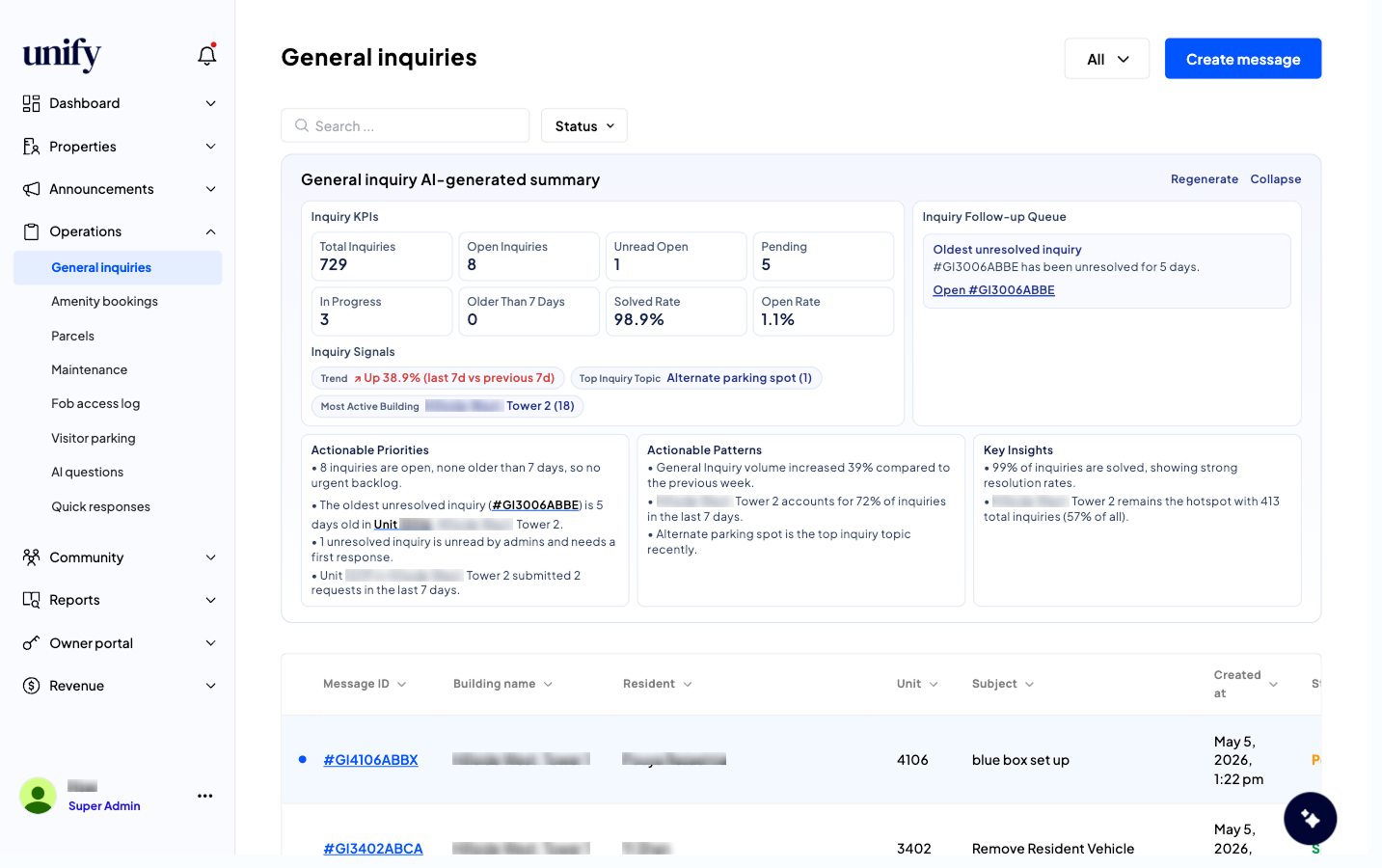
LIV platform | General Inquiries with AI-generated summary (Operations → General inquiries). The AI surfaces inquiry KPIs, actionable priorities, and key patterns automatically including which buildings are most active and what topics are trending.
In addition to the AI Virtual Concierge Chat feature that gives a quick response to resident’s questions, the General Inquiries feature enable residents to create a ticket with more complex inquiry that requires a human staff to respond.The General Inquiries’ AI-generated summary panel runs continuously above the inbox of tickets coming in to the LIV platform. It tells the management team what the inquiry volume is doing right now, which unit submitted three requests in the last week, and which building is generating the most activity without anyone pulling a report. The “Regenerate” button refreshes the analysis against the latest data on demand. The AI Virtual Concierge and the General Inquiries ticketing feature together resulted in reducing phone calls by 40% (link to Concord Brentwood Customer Story).
Removing the tasks that never needed a human decision
There is a category of work in building operations that is high-frequency, time-consuming, and does not require the judgment of a trained property manager. Writing urgent elevator out of service notices. Logging incoming parcels. Acknowledging receipt of maintenance request. These tasks get done multiple times a week, often under time pressure, and they accumulate quietly until someone totals them and realises that a significant portion of the week is going to work that could be handled differently.
Workflow automation isn’t about replacing judgment. It’s about removing the portion of the job that does not require human judgment in the first place.
Building updates: AI drafting inside the editor
When an elevator goes down at 6:30 AM, the communication needs to go out before the lobby fills. That notice needs to tell residents what happened, what they should do right now, what the team is doing, and when the next update is coming. Written from scratch under morning pressure, it takes fifteen to twenty minutes and it gets written differently depending on who’s at the desk.
Inside LIV’s Building Updates editor, the Unify LIV AI panel sits directly inside the content field. Staff enters a short prompt about what happened, the key facts and the AI generates a complete, properly structured update in seconds. Staff reviews, edits if needed, and sends. Consistent format every time. Total time: under two minutes.
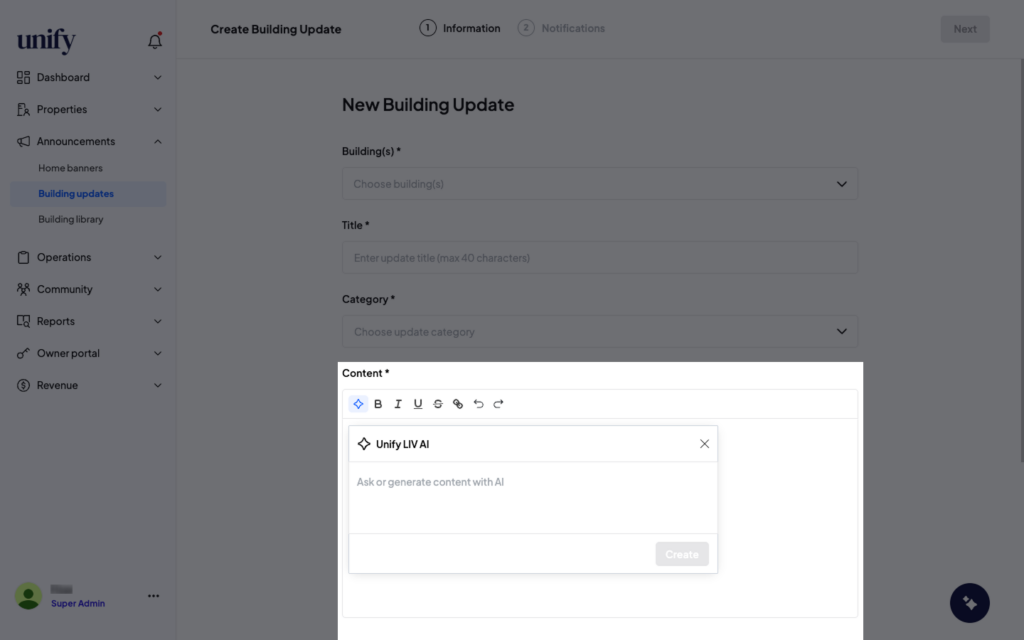
LIV platform | Unify LIV AI drafting tool inside Building Updates (Announcements → Building updates → Create). The AI panel opens inline within the content editor. Staff prompts the AI with key facts; the AI generates the complete update ready to review and send.
The Unify LIV AI panel is visible directly inside the content editor, not a separate tool, not a different screen. The draft appears in the same field where staff would normally type, which means the review and send workflow is identical to what the team already knows. Adoption doesn’t require retraining.
When operational data is unified, it starts telling you things
The first three layers produce something most buildings have never had: a single, consistent, timestamped record of everything that happens operationally. Maintenance requests,Communications,Amenity bookings,Form submissions, Payments, andViolations. All tied to a unit and a user, logged through one system, structured the same way every time.
Accumulated over weeks and months, that record becomes the input for something genuinely valuable operational intelligence that runs continuously and surfaces what needs attention before it becomes a problem.
Most property management analytics are backward-looking. You export a report. You look at last month. You present a summary to the board. A more meaningful report goes further — it analyzes historical records and patterns to predict trends and surface data-driven, actionable insights before they become costly problems.
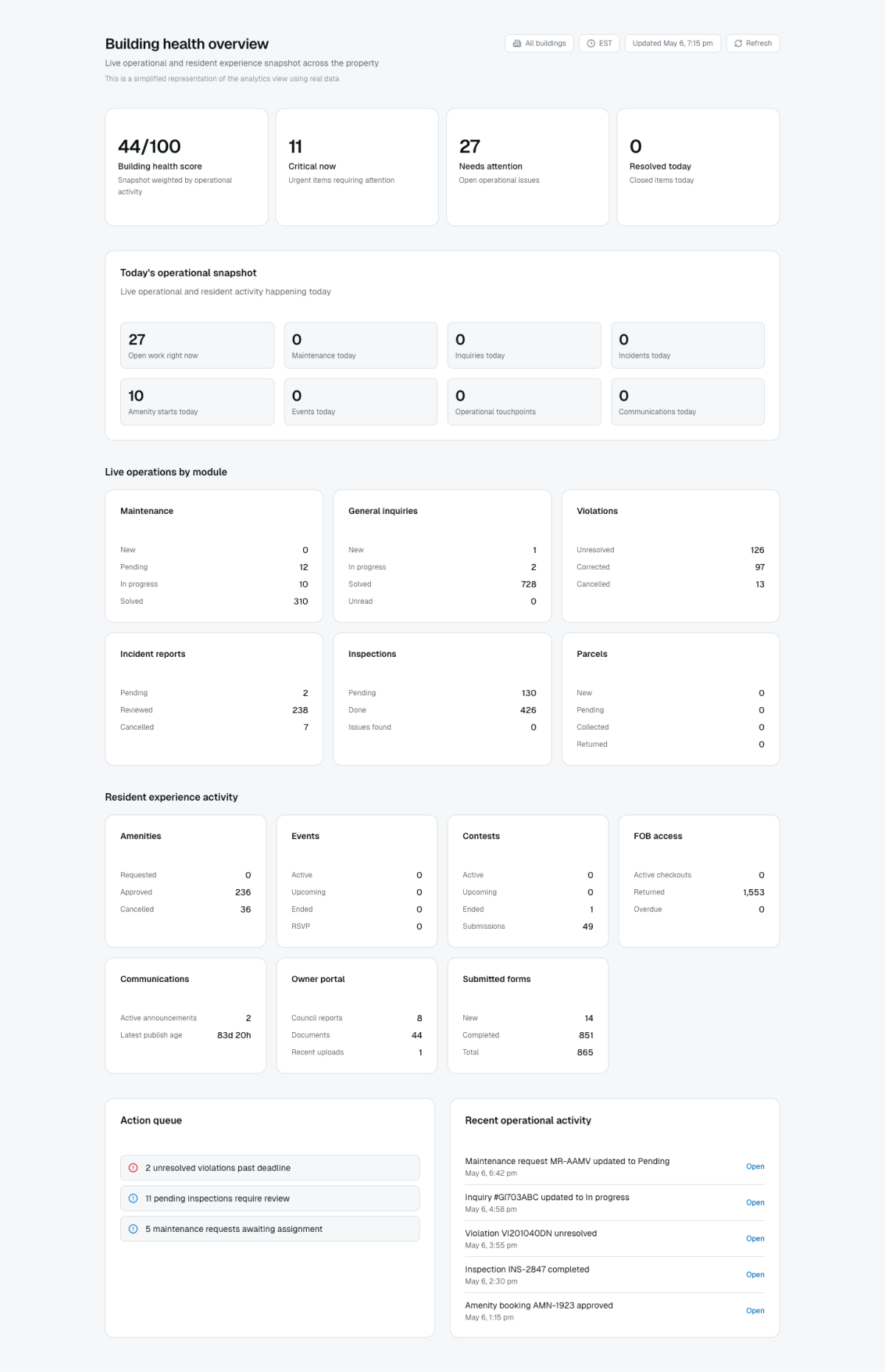
LIV platform | Building Health Dashboard (Dashboard → Building Health). A live operational snapshot showing building health score, critical items, open work, maintenance, inquiries, and incidents all updating in real time across every module.
The Building Health dashboard gives management and ownership a single number the building health score backed by live data across every module. 55/100 means 10 critical items require immediate attention, 14 operational issues are open, and the breakdown by module (maintenance, general inquiries, violations, parcels, inspections) tells exactly where to focus. LIV’s AI-generated summaries run across multiple views; the Calendar summary, the Advanced Analytics by Feature and the Building Health score all use the same AI layer to interpret the operational data and direct attention to what matters. Owners and boards see what’s happening real-time. Property managers can show exactly what volume they’re carrying and where the pressure is coming from.
Understanding the pattern of top violated bylaw or community policy, top general inquiries, or most frequent maintenance request provides data-based predictive insights for actions the owners and board can take.
This is what it means to own the intelligence layer. Not just collecting data using it to act earlier, with more confidence, backed up by data-driven analytics.